Monitor Arm - Lighting & Accessories - Herman Miller Official Store
Divider
Curve

Click on image to zoom

Curve
Curve

Monitor Arm

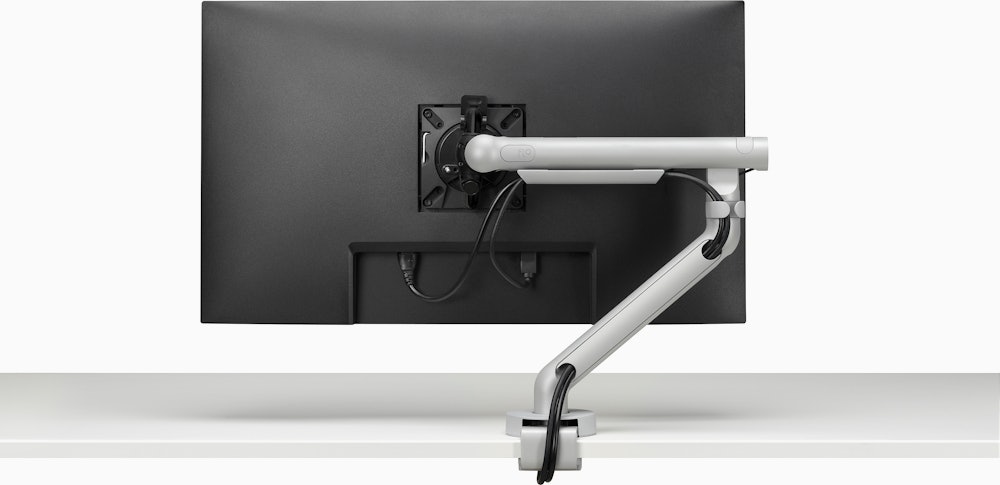
This easy-to-adjust arm lets you position your monitor to suit the way you’re sitting, allowing you to move freely as you work while reducing eyestrain. And it frees up worksurface space.

View Full Description
Curve
Configure Your Monitor Arm
Curve
Monitor Arm

Big Benefits from a Small Accessory

Here's a simple and cost-effective way to help you position your flat panel monitor so that your eyes stay focused and you maintain a healthful posture during long hours at the computer. Both the Single and Dual Monitor Arms let you shift your monitor easily from landscape to portrait.

  • Comfort Enhances Creativity

    Comfort Enhances Creativity

    Long hours seated at a computer can cause eye, neck, and back strain and reduce blood circulation and your ability to concentrate. Aligning your technology with your body, leads to less eye and muscle strain.

  • Versatile and Easy to Install

    Versatile and Easy to Install

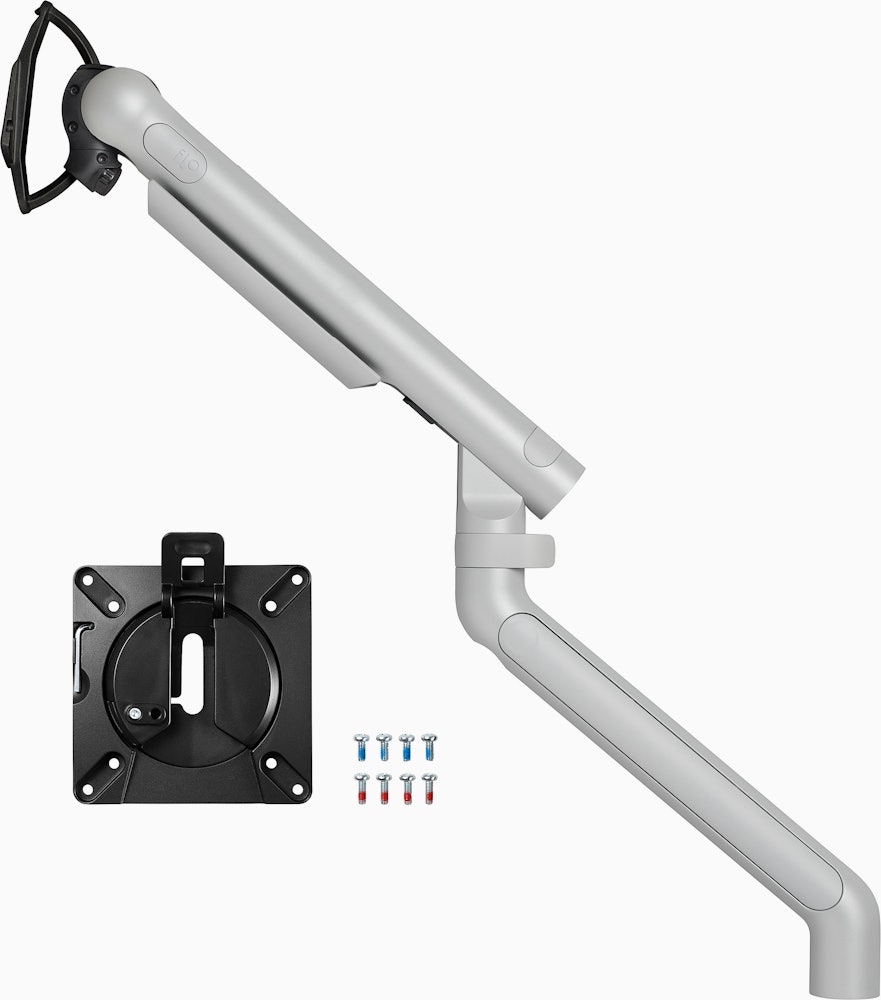
    Clamp it onto your desk or worksurface (up to 1 7/8 inches thick). A special bracket is also included for thinner profile desks, like Envelop. Then route your computer cables along the underside of the arm, to keep them out of the way.

  • The Nuts and Bolts

    The Nuts and Bolts

    • Has a 22 ½-inch extension range
    • Holds a 7- to 20-pound,flat-panel monitor with an   LCD size up to 24 inches
    • Provides 160-degree monitor rotation; 80-degree   tilt, 90-degree horizontal rotation, so you can view   the monitor in portrait or landscape
    • Swivels 360 degrees and remains stable during   adjustment
    • Meets VESA monitor arm standards

  • Lift Assist

    Lift Assist

    The Single and Dual monitor arms are available with a lift assist mechanism that allows 13 inches of height adjustment for the monitor and is recommended for frequent monitor adjustment. Includes an Allen wrench for adjusting arm height along the mounting post.

Monitor Arm

Who Adjusts?

Who Adjusts?

There is no universally "correct" monitor height or viewing distance. But when technology doesn't adjust to you, you have to adjust to the technology. This is a problem, because you often make adjustments—hunching, craning, squinting—that cause your muscles to stiffen and ache. And poor posture leads to fatigue.

Two dimensions affect how we view our monitors while working—the height of our eyes from the seated position, and the distance of our eyes from the monitor. Among U.S. adults, eye height when seated varies by almost a foot—11.4 inches.

Research shows that people choose a viewing distance of somewhere between 20 and 39 inches. And just to complicate the picture even more, the distance an individual prefers usually changes with age.

And let's add to these issues the fact that a change in input devices is taking place—from the mouse and keyboard to the increasingly popular touchscreen. Accommodating touchscreens requires a large range of adjustment that allows the monitor to be an input device one moment and an output device the next.

The Solution


The solution? A flat screen monitor arm that allows a full range of adjustments. You must be able to change positions easily throughout the day and adjust the monitor so that it's always at the correct height and distance for you.

Beginning with the Legs

Single Arm

General Dimensions

  • H:6-18.5"
  • W:20.5-23"
  • D:4.5"
Standard Mount
Single Monitor Arm Universal Mount

Envelop Only Mount
Single Monitor Arm Envelop Mount

Shipping Information

Standard Shipping Method:
Fed Ex
Packaging Type:
Box
Packaging Dimensions:
24" x 9" x 6"
Package Weight:
13.9 lbs.
Assembly Required:
Yes
White Glove Service Recommended:
No

Warranty

Warranty:
5-year
Full Warranty:
View PDF

Dual Arm

General Dimensions

  • H:6-18.5"
  • W:20.5-23"
  • D:4.5"
Standard Mount
Double Monitor Arm Universal Mount

Envelop Only Mount
Double Monitor Arm Envelop Mount

Shipping Information

Standard Shipping Method:
Fed Ex
Packaging Type:
Box
Packaging Dimensions:
24" x 9" x 6"
Package Weight:
21.2 lbs.
Assembly Required:
Yes
White Glove Service Recommended:
No

Warranty

Warranty:
5-year
Full Warranty:
View PDF

Care & Maintenance

With regular care and maintenance, your Herman Miller product will provide many years of superior performance and satisfaction. To maintain quality, please follow the cleaning procedures outlined here.

The instructions for the care and maintenance of Herman Miller products are provided to you as a service. No warranty is implied since results may vary.

Divider

Coated Metal

For normal cleaning, wash coated metal surfaces with a soft cloth soaked in detergent and warm water; rinse thoroughly and dry. Remove scuff marks from low-gloss coatings with pre-softened paste wax, following the manufacturer's instructions. Remove scuff marks and scratches from high-gloss coatings using automotive polishing compounds, either liquid or paste. After polishing, apply a pre-softened automotive paste wax to restore original sheen. For assistance in determining the appropriate color and gloss for Herman Miller touch-up paint, contact your Herman Miller Customer Service Representative.

Plastic

For normal cleaning, wash plastic surfaces with a soft cloth soaked in mild detergent and warm water. Rinse thoroughly and dry with a soft cloth. Do not use solvents or abrasive kitchen cleaners.

Curve
(2 Questions : 2 Answers)

Product Q&A

Ask your questions. Share your answers.


« Back
 
 
Lcd weight :
30" 26.50 lb
24" 15.4 lb
5 months, 2 weeks ago
Customer avatar
by
Seattle
Read all my Q&A
 
Please wait while more information about djdjd is loaded.
Additional information about djdjd could not be loaded.
0points
0out of 0found this question helpful.
Was this helpful?helpful0unhelpful0
1 Person needs an answerI have this question too

Answers

Answer: 
The Monitor Arm available on the Herman Miller Store is rated for up to 20 lbs and a maximum LCD size of 24 inches for the Envelop Desk. Herman Miller does offer additional monitor arm options that can accommodate your specific needs. For assistance with ordering a monitor arm to fit your monitors, please contact a Herman Miller Dealer in your area. To find the dealer closest to you, please visit:

http://www.hermanmiller.com/Where-T...

For any additional questions, please feel free to contact Herman Miller Customer Care at 888.798.0202.
5 months, 2 weeks ago
Customer avatar
by
Zeeland, MI
Read all my Q&A
 
Please wait while more information about Shannon is loaded.
Additional information about Shannon could not be loaded.
0points
0out of 0found this answer helpful.
Was this helpful?helpful0unhelpful0
Has staff answer
 
1 answer

Apple 27" Thunder Bolt Display

Can this Arm be used with Apple's Thunder Bolt Display.
7 months ago
Customer avatar
by
Anonymous
Grand Rapids
+1point
1out of 1found this question helpful.
Was this helpful?helpful1unhelpful0
1 Person needs an answerI have this question too

Answers

Answer: 
Yes, the Monitor Arm is compatible with Apple's 27" Thunder Bolt Display as long as you have the adapter in place. You will need the VESA Mount Adapter Kit for iMac and LED Cinema or Apple Thunderbolt Display installed on your display to connect with Monitor Arm.

For more information on the adapter kit, please visit Apple: http://store.apple.com/us/product/M...
7 months ago
Customer avatar
by
Zeeland, MI
Read all my Q&A
 
Please wait while more information about Shannon is loaded.
Additional information about Shannon could not be loaded.
0points
0out of 0found this answer helpful.
Was this helpful?helpful0unhelpful0
1 of 1

Product Q&A

2 Questions | 2 Answers
1 of 1